There are countless project management apps out there, but many of them are packed with features I never use. So I asked Gemini, ChatGPT, and Copilot to build a Kanban board that worked offline, saved my data locally, and didn't require yet another subscription. I gave all three the same prompt and tested the results, and they all created working apps. But the one I liked most surprised me.
I needed each AI to create a standalone file that I could double-click to open in my browser. Beyond wanting something that worked on my terms, I was keen to see whether the AI assistants could produce something that anybody—from beginner to pro—could actually use. The idea was similar to the board view used by tools like Trello, but without accounts, subscriptions, or unnecessary features.
Specifically, it needed a Kanban board layout with four columns: To Do, In Progress, Review, and Done. Each task needed to have a title, an area for notes, a priority rating, and a due date, and I also wanted to be able to add, edit, and delete tasks, as well as drag and drop them between columns.
I've included the full prompt I used at the end of this article. You can copy it, adapt it, and ask your preferred AI assistant to create your own version.
Once each model produced the code, I pasted it into Notepad and saved it on my desktop as an HTML file. Then, I opened each one and compared them based on how they looked, how they worked, and whether I could actually keep using them.
The differences weren't in basic functionality: all three created the kind of offline project tracker I was looking for. The interesting part was the design choices each AI made beyond the original prompt.
Gemini was the first AI assistant I put under the microscope, and as soon as I opened its version of the app, I knew I would happily use it.
It had a refined, professional appearance with a clean layout and excellent use of space. The four columns were easy to understand, and the interface felt focused on the tasks, not the controls around them.
The task cards were probably my favorite part of Gemini's version. Priority was represented by a colored strip down the left side of each card, making important tasks easy to spot without adding clutter. The "Edit" and "Delete" buttons only appeared when I hovered over a card, a nice touch that kept the board looking tidy.
The task creation window was also well-designed. It included the fields I expected, with the title field clearly marked as required with an asterisk, and "Medium" selected as the default priority.
Gemini also made a smart choice for handling larger numbers of tasks. When a board grew beyond the height of my screen, it adopted its own scrolling bar, rather than forcing me to move the whole window down. This meant that the rest of the interface stayed visible at all times.
The only downside was that Gemini added fewer touches beyond the original brief. It created a very good Kanban board, but it didn't provide anything for me to get excited about. That said, at this stage, Gemini felt like the one to beat.
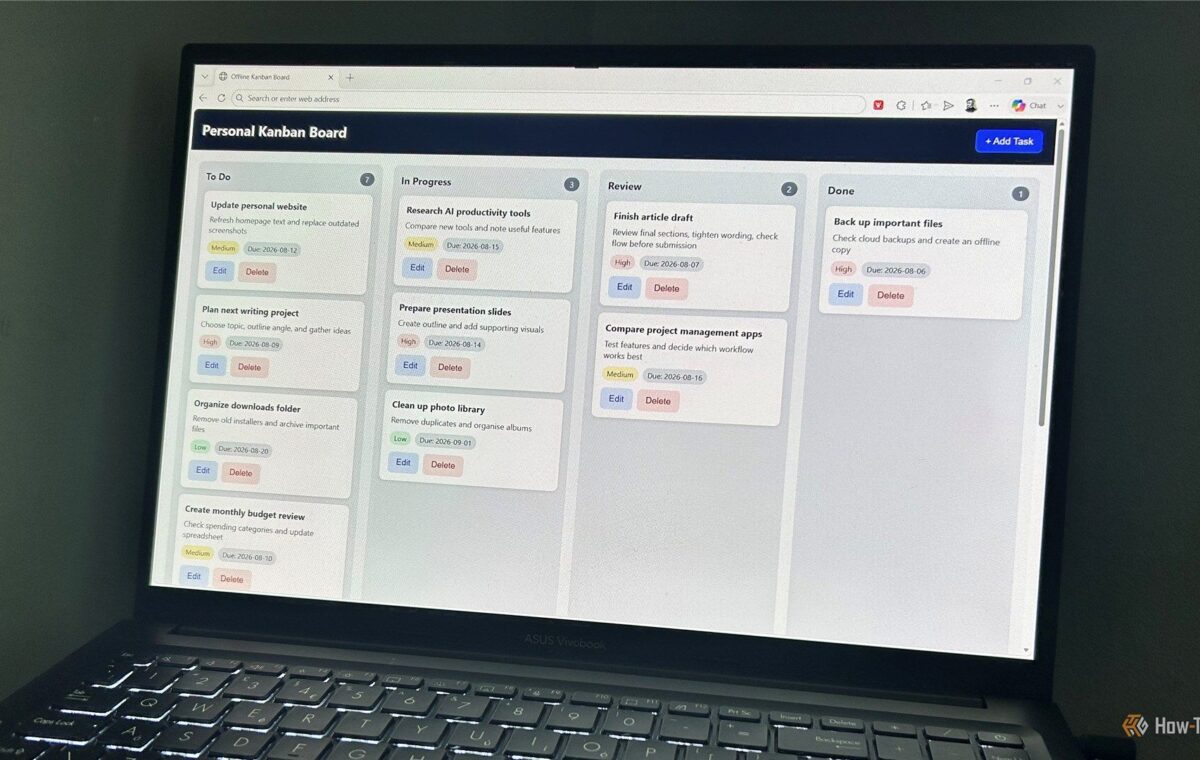
ChatGPT's version took a different design approach from Gemini. Where Gemini focused on keeping the board clean and understated, ChatGPT created something more visually prominent.
The dark banner across the top made it feel like a polished app with a stronger identity and a more deliberate design language. However, it also made the interface feel a little more "in-your-face" than Gemini's cleaner approach. For some, that would be fine, but for me, it felt a bit overwhelming.
The biggest difference was in the task cards. ChatGPT displayed more info by default: the "Edit" and "Delete" controls were permanently visible, and the text was bolder throughout the interface. That made the cards feel more substantial, but I preferred Gemini's stripped-back approach of keeping controls hidden until needed.