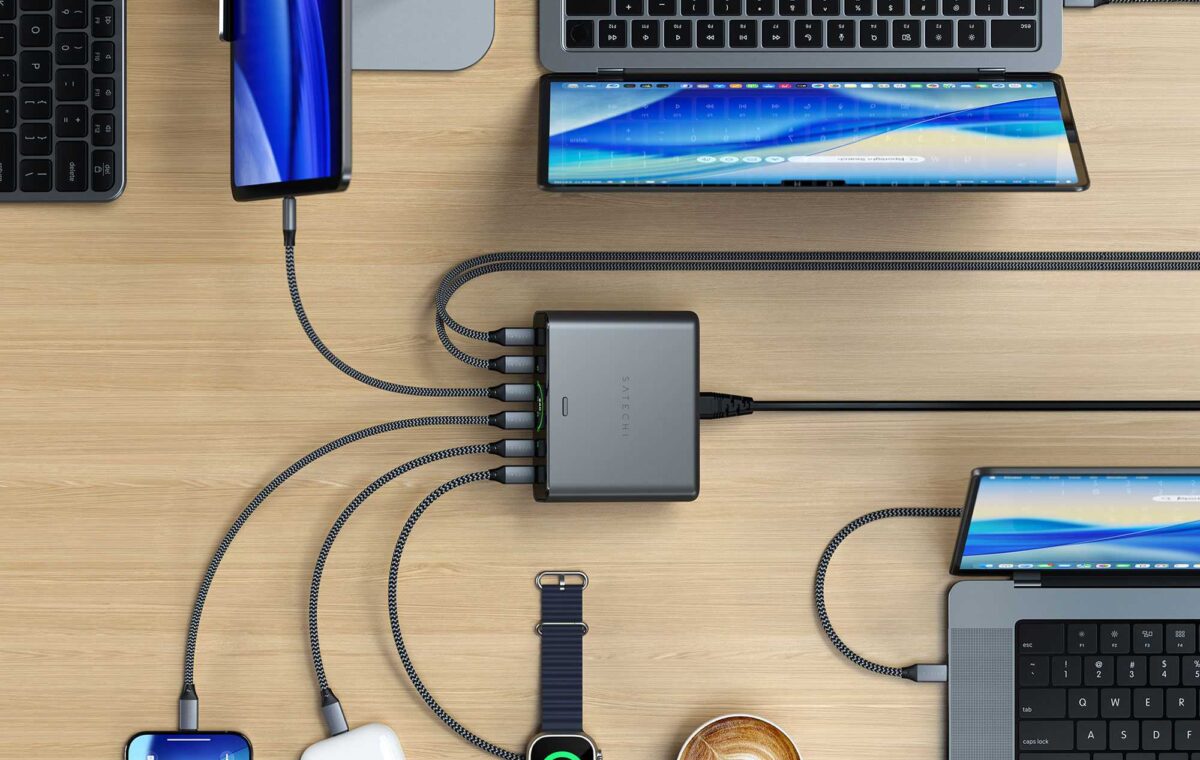
When wall chargers get unwieldy a desktop charger offers a more stable solution in multiple-device charging environments. With a choice of four or six smart ports and up to 240W total output plus an informative display, the Satechi ChargeView is a compact desktop charger that can keep a bank of desks fully charged in a minimal footprint.
This value will show the geolocated pricing text for product undefined
What is it? A high-powered desktop charger with six USB-C ports.
Who is it for? Users of many USB-C-powered devices and/or IT teams looking for a simple charging solution for multiple nearby users. Buy the 240W model if you regularly charge two or more MacBooks at once, or want enough headroom to fast-charge laptops, iPads and iPhones simultaneously. Choose the cheaper 140W version if your typical setup is one MacBook plus a handful of smaller Apple devices.
Who shouldn’t buy it? People who need legacy USB-A ports. Those wanting fewer ports can consider the 4-port ChargeView 140W model.
We’ve all got USB wall chargers incongruously sticking out of our power sockets, and some boast multiple ports to handle our many devices crying out for power.
The Satechi 145W USB-C 4-Port wall charger, reviewed in our travel charger section below, has four USB-C ports. The Ugreen Nexode Pro 160W 5-Port USB-C wall charger has four USB-C and a USB-A port but try to stick anything larger in your plug socket and it will likely take your wall out if it gets a knock. If you are frequently pulling out charging cables for new devices, anything over three ports is about the limit for wall-charger stability.
You’ll get higher power and more ports from a desktop charger that plugs into the socket with a cable rather than directly with plug pins incorporated into the wall charger itself. Resting on your desk it should cover all your device charging requirements.
Satechi had a 6-Port USB-C GaN Charger that could handle a total of 200W and has now updated this with its new 6-port ChargeView 240W Desktop Charger. This has the same six USB-C ports but more power to share between them. It also has a 4-port ChargeView 140W Desktop Charger for those with fewer devices to charge at the same time.
All of the ChargeView’s ports are USB-C. If you still have older devices that require a legacy USB-A port, you need to look at some of the other best desktop USB-C chargers we’ve tested.
Two of the USB-C ports support PD 3.2 for 140W charging. This is what the 16-inch MacBook Pro demands for fast charging. Two more support 100W each, and the final two can output 30W.
Of course, you invest in a desktop charger for its multiple port combinations.
As the maximum power output is 240W you can’t use the two 140W ports with each at full power. Instead the most you’ll get is 140W+100W, and really any other combination: 100W+100W, 140W+30W, 100W+30W, 100W+100W, and 30W+30W, for example.
Three ports in use at the same time gets more interesting, with possibilities such as 100W+100W+40W, 100W+70W+70W, 100W+100W+30W, 100W+30W+30W. These combinations allow for a 14-inch MacBook Pro plus an iPhone and an iPad all to be fast-charged at the same time, or a MacBook Pro and two MacBook Airs.
Want to simultaneously fast-charge a MacBook Pro, MacBook Air, an iPad Pro and an iPhone? The ChargeView 240W has you covered using four of its ports. You could charge 100W+70W+40W+30W, for example.