I have a degree in Computer Animation, but there was so much research attached to it that I really felt like I was drowning. I spent more time than I'd like to admit dealing with highlighters and index cards, trying to absorb material that felt like it was written to confuse instead of explain. The problem was never motivation or effort. It was that building study materials, getting through dense papers, and keeping organized notes ate up the time I actually needed for learning.
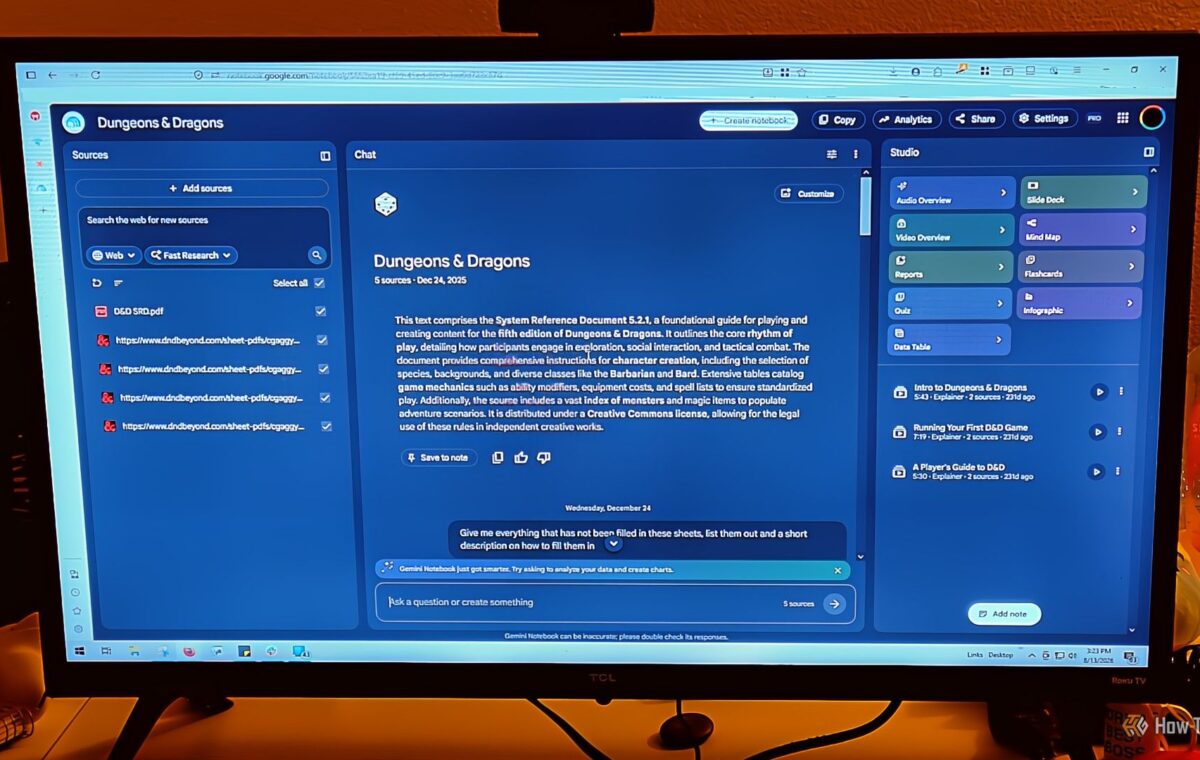
Google's NotebookLM (now known as Gemini Notebook) is a good tool for students, and if I were heading back to college today, it's the first thing I'd set up for every class. The basic idea is that you build a private notebook around your actual course materials like syllabi, textbooks, lecture notes, Google Docs, web links, even recorded audio from lectures. It’s great at making your life easier.
Then the AI works exclusively from what you've uploaded. It doesn't go hunting around the internet for answers. Everything stays contained within the boundaries you've set for it. Most AI tools pull from the web, which means you can end up with information that's not accurate (like from Reddit) or has nothing to do with what your professor actually covers or expects.
With Gemini Notebook, when you ask it to explain a concept, compare competing arguments, or put together a practice exam, it's drawing only from your materials. So if your professor has a particular take on something, or uses a specific framework, the AI is working from that same source, not some generic textbook version from across the internet.
That's why I don't mind paying for Gemini Notebook; it only gives me what I want to learn about, not someone's random take on it. What's great is that everything it gives you comes with inline references tied back to your source documents. I personally like the audio overviews for memorizing this information.
I like reading non-fiction, but the research papers in college felt like they didn’t care about being interesting. I was already tired from the regular workload, and academic PDFs and technical documents are full of specialized jargon that makes no sense, complicated equations, and dry writing that made reading feel like a grind.
If I were heading back to college today, one tool I'd have opened on my second monitor is Explainpaper, a reading assistant built specifically to break down the hardest parts of any academic paper. It works like a personal tutor and helps you push through the parts of a text that would otherwise send you down a two-hour Wikipedia rabbit hole.
This sounds like a job for Gemini Notebook, but it's actually awful at handling one large document and remembering everything, which is why Explainpaper is better for that situation.
You upload your PDF or paste a document link, and it goes from there. Highlight any sentence, paragraph, chart, or equation that's losing you, and a plain-English explanation pops up in the side panel. It has a complexity slider that lets you tell it to explain something like you're five, like you're in high school, like you're an undergrad, or at a graduate level.
The explanations are pulled from large language models, including GPT-4o on the paid tier, so even the most abstract concepts tend to come with real analogies and useful context. It also reads highlighted passages in relation to the surrounding argument rather than in isolation, which matters more than you'd think. And if the explanation still leaves you with questions, there's a follow-up chatbot you can use to keep pulling at the thread.
I am great at studying, thanks to my time in NJROTC and in a Law Enforcement Academy, but in college, it was hard to set up my study tricks. A huge chunk of that busywork has always been making study materials from scratch, like writing out definitions, cutting index cards, and formatting review sheets. It takes so long, and you haven't even started studying yet.
Quizlet basically solves that. You feed it your reading material, and it spits out flashcards and review tools automatically, so you can skip straight to the learning part. You can throw a PDF, a photo of your notes, or a typed document at it, and it'll restructure everything into something you can actually study from.
The main feature behind this is something Quizlet calls Magic Notes. You upload a textbook chapter or a picture of your handwritten notes, and it reads through everything and builds you a flashcard deck. What makes it more useful than just any random flashcard app is that the cards are built around active recall, so instead of just showing you a term and its definition, they make you pull the answer out of your own memory before revealing it.
On top of that, Quizlet handles the timing of your studying, which most people completely ignore. I've never tried to cram the night before because I want to learn, not just regurgitate information. Quizlet tracks how you do on every card and adjusts accordingly. Struggle with something, and it'll show it to you again soon.
I am not a fan of lectures. There's just so much spoken information flying at you constantly, and no clean way to catch all of it. Otter.ai would have been the best staple for me. In a typical university setting, you're dealing with a lot of unstructured audio, and professors don't always make it easy to follow.