I spent hours troubleshooting my TV until I found an outdated cable hiding behind it — I recently hooked up an old PC to my TV, expecting it to be the perfect way to turn my living room into a makeshift gaming setup. The hardware was more than capable, and both the PC and TV supported the refresh rates I wanted, so I assumed everything would work without a hitch. Instead, I was greeted by constant stuttering, flickering, and occasional black screens that made the whole setup feel broken.
Naturally, I started blaming the obvious culprits. I spent time changing display settings, checking refresh rates, and making sure the TV was in Game Mode, but nothing seemed to make a difference. The eventual fix turned out to be far simpler than I expected, and it had nothing to do with the PC or TV themselves. A forgotten piece of hardware sitting behind my TV was quietly getting in the way of the signal, and removing it immediately solved the problem.
Recently, I grabbed an old PC and decided to set it up as a console in my living room. I popped it down and plugged it in, expecting it to be pretty straightforward. Unfortunately, I hit a wall straight away. Despite my PC being more than capable enough to run the titles I was playing, everything felt clunky and slow.
The first thing that I encountered was what felt like a drop in frame rate. While both my PC and my TV were capable of outputting a high-quality image at 120Hz, things were stuttering straight away. This initially made me worry that my computer was ready to give up the ghost, but the more I experimented, the more I felt like something else was the issue.
Alongside the stuttering image, the connection would occasionally be lost, with my TV going dark for a couple of seconds before everything would come back. I spent longer than I care to admit fiddling with settings on both my TV and my computer, from adjusting refresh rates to making sure that Game Mode was turned on. The problem was much simpler than that, though, with the culprit being a little cable dangling behind my TV.
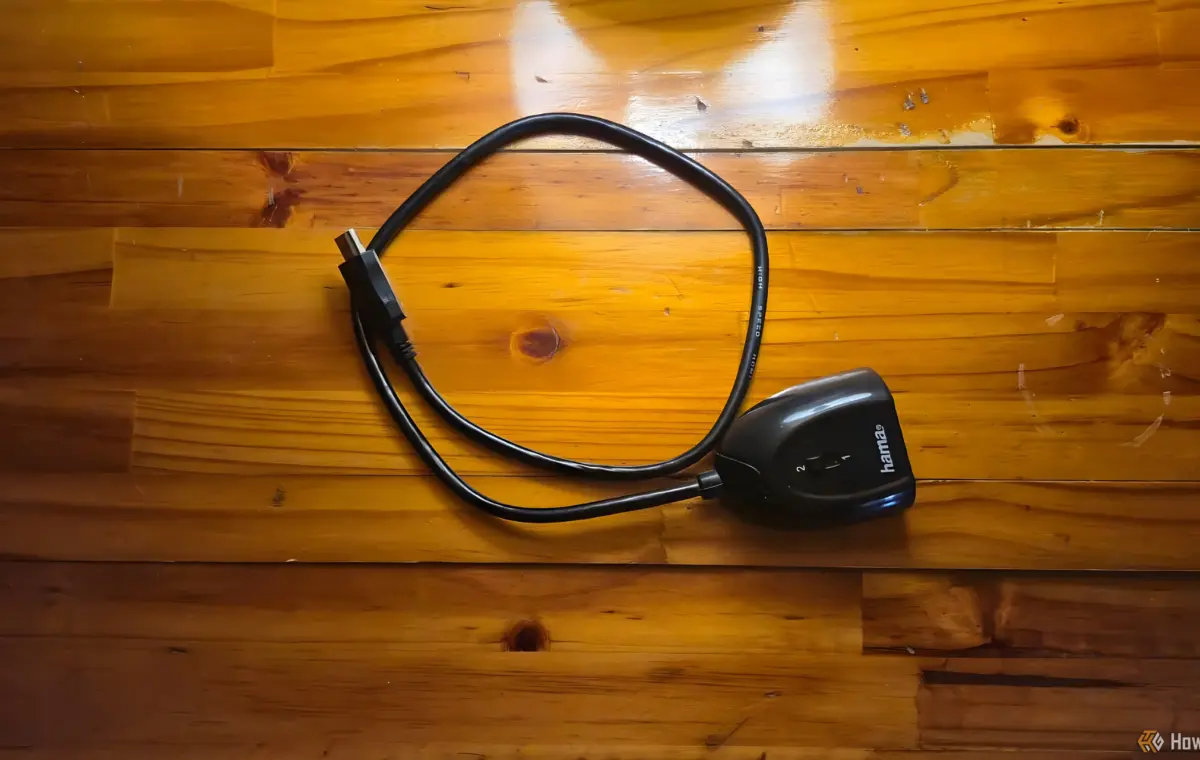
Back when I first got my TV, I had too many things that I wanted to keep plugged in all at once. Searching through my box of cables, I found an HDMI switch that allowed me to swap between two inputs. After cleaning up my setup and moving a lot of things into my office, I apparently left the HDMI switch behind, with an HDMI cable plugged into it. Without thinking, I plugged my PC in without checking the other end of the HDMI.
Turns out that the little cable was the cause of all of my problems. A simple extra connection in the chain was not only causing dips in connection but also a lower refresh rate. Removing it from the chain and plugging things directly into my TV completely solved all of the problems. The flickering was gone and everything appeared to be running at a higher frame rate.
Not only was this a good reminder to check the cables I was using, but it also prompted me to sift through my big box of spare cables and devices and trash anything else that was outdated or wasn't being used.
All it took to fix my problems was to remove the old HDMI switch from my setup and plug my PC in directly. Making sure that you don't have any old or forgotten things plugged into your setup can make a big difference. You might not think that something as simple as an HDMI switch could affect image output so drastically, but checking your hardware first can save you a lot of time troubleshooting.
The switch that I had plugged in didn't have any heavy-duty purposes when I first used it, which was also admittedly a long time ago. The combination of its age and the demanding signal that it was dealing with exposed its weaknesses. You can also run into the same kind of problems with a cheap switch. The higher the bandwidth required, the more likely it is that your switch is going to struggle to produce a clean and smooth image.
This isn't to say that you shouldn't use HDMI switches. Modern, high-quality splitters can handle some pretty heavy-duty tasks and can be a great addition to a setup. It not only gives you access to another port, but it also means that you don't have to swap cables constantly, instead of flicking a switch to swap inputs.
This 5X1 HDMI switch from UGREEN is the best option for most people because it’s affordable, offers five HDMI 2.0 inputs, and supports a 4K@60Hz output.
While there are a ton of neat cables and gadgets out there that allow you to do much more with your setup, oftentimes the simplest way forward is the best. In my case, a switch that was meant to make my life easier ended up causing display issues and making me worry that there was something wrong with my setup. It's a good reminder to clean out any old hardware that you don't use anymore and stick with modern, high-quality products instead.
I recently hooked up an old PC to my TV, expecting it to be the perfect way to turn my living room into a makeshift gaming setup. The hardware was more than capable, and both the PC and TV supported the refresh rates I wanted, so I assumed everything would work without a hitch. Instead, I was greeted by constant stuttering, flickering, and occasional black screens that made the whole setup feel broken.
Naturally, I started blaming the obvious culprits. I spent time changing display settings, checking refresh rates, and making sure the TV was in Game Mode, but nothing seemed to make a difference. The eventual fix turned out to be far simpler than I expected, and it had nothing to do with the PC or TV themselves. A forgotten piece of hardware sitting behind my TV was quietly getting in the way of the signal, and removing it immediately solved the problem.
Recently, I grabbed an old PC and decided to set it up as a console in my living room. I popped it down and plugged it in, expecting it to be pretty straightforward. Unfortunately, I hit a wall straight away. Despite my PC being more than capable enough to run the titles I was playing, everything felt clunky and slow.
The first thing that I encountered was what felt like a drop in frame rate. While both my PC and my TV were capable of outputting a high-quality image at 120Hz, things were stuttering straight away. This initially made me worry that my computer was ready to give up the ghost, but the more I experimented, the more I felt like something else was the issue.
Alongside the stuttering image, the connection would occasionally be lost, with my TV going dark for a couple of seconds before everything would come back. I spent longer than I care to admit fiddling with settings on both my TV and my computer, from adjusting refresh rates to making sure that Game Mode was turned on. The problem was much simpler than that, though, with the culprit being a little cable dangling behind my TV.
Back when I first got my TV, I had too many things that I wanted to keep plugged in all at once. Searching through my box of cables, I found an HDMI switch that allowed me to swap between two inputs. After cleaning up my setup and moving a lot of things into my office, I apparently left the HDMI switch behind, with an HDMI cable plugged into it. Without thinking, I plugged my PC in without checking the other end of the HDMI.
Turns out that the little cable was the cause of all of my problems. A simple extra connection in the chain was not only causing dips in connection but also a lower refresh rate. Removing it from the chain and plugging things directly into my TV completely solved all of the problems. The flickering was gone and everything appeared to be running at a higher frame rate.
Not only was this a good reminder to check the cables I was using, but it also prompted me to sift through my big box of spare cables and devices and trash anything else that was outdated or wasn't being used.
All it took to fix my problems was to remove the old HDMI switch from my setup and plug my PC in directly. Making sure that you don't have any old or forgotten things plugged into your setup can make a big difference. You might not think that something as simple as an HDMI switch could affect image output so drastically, but checking your hardware first can save you a lot of time troubleshooting.
The switch that I had plugged in didn't have any heavy-duty purposes when I first used it, which was also admittedly a long time ago. The combination of its age and the demanding signal that it was dealing with exposed its weaknesses. You can also run into the same kind of problems with a cheap switch. The higher the bandwidth required, the more likely it is that your switch is going to struggle to produce a clean and smooth image.
This isn't to say that you shouldn't use HDMI switches. Modern, high-quality splitters can handle some pretty heavy-duty tasks and can be a great addition to a setup. It not only gives you access to another port, but it also means that you don't have to swap cables constantly, instead of flicking a switch to swap inputs.
This 5X1 HDMI switch from UGREEN is the best option for most people because it’s affordable, offers five HDMI 2.0 inputs, and supports a 4K@60Hz output.
While there are a ton of neat cables and gadgets out there that allow you to do much more with your setup, oftentimes the simplest way forward is the best. In my case, a switch that was meant to make my life easier ended up causing display issues and making me worry that there was something wrong with my setup. It's a good reminder to clean out any old hardware that you don't use anymore and stick with modern, high-quality products instead.
Written by https://futureknowledge.in/ | Source: www.howtogeek.com
Written by https://futureknowledge.in/