I have spent years using mechanical keyboards, and Hall Effect switches never really tempted me away from them. I understood the gaming appeal. Adjustable actuation and Rapid Trigger can make a meaningful difference in competitive games, but I also spend hours every day writing. Typing experience matters just as much to me.
The $219 MelGeek MADE68 Ultra V2 has made that distinction considerably harder to maintain.
I’ve used it as my only keyboard for the past month, both for work and gaming in Rainbow Six Siege, Counter-Strike 2, and Overwatch. Its Hall Effect implementation is excellent, HIVE 2.0 gives me an almost ridiculous amount of control, and the lighting is unlike anything I’ve used before. Surprisingly, none of those are what I would miss most if I stopped using it tomorrow. I would miss typing on it.
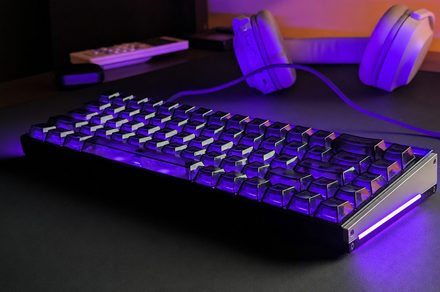
My Night Purple model has a black-and-purple theme inspired by Reyna from Valorant, surrounded by a bright 360-degree RGB light bar. It’s not subtle, but I like it.
More importantly, the MADE68 Ultra V2 feels expensive. The CNC aluminum chassis weighs 1,175 grams (2.6 lbs), and there is no flex, creaking, loose panels, or uneven fit anywhere I can find. It stays planted even when I’m hammering WASD during an intense Siege match.
Moving from the 75% keyboards I’ve used for years to a 65% layout also gives me noticeably more mouse room. Unfortunately, the smaller layout exposed my biggest problem with this keyboard.
The transparent polycarbonate keycaps look fantastic, but they’re a usability headache. Many secondary functions, including F1 through F12, aren’t labeled, while the legends aren’t shine-through. Cranking up the RGB can actually make them harder to read.
I touch type and they still annoy me. If I keep the MADE68 Ultra V2 as my daily driver, the keycaps are the first thing I’m replacing.
My review unit uses MelGeek’s linear KOM Lite magnetic switches, and they’re the reason I would keep this keyboard. They’re light, remarkably smooth, and consistent across the board. There is practically no noticeable stem or keycap wobble, while the return feels quick and clean. More importantly, they remain comfortable through long workdays where I’m typing for hours.
I love how they sound too. The KOM Lite switches have a crisp, snappy character that’s clearly audible without becoming obnoxiously loud. Letter and number keys sound remarkably consistent, while the stabilized keys have a slightly deeper version of the same sound. I couldn’t detect any meaningful stabilizer tick or rattle either.
Backspace is the only slight exception, producing a somewhat hollower, higher-pitched tone.
MelGeek uses a silicone gasket mount and several dampening layers, but don’t expect a soft or bouncy typing experience. The MADE68 Ultra V2 feels firm and stable. I can force visible gasket movement by pressing unusually hard, but I don’t feel it during normal use. After a month, typing remains my favorite part of this keyboard.
The MADE68 Ultra V2 offers adjustable actuation from 0.1mm to 3.4mm per key. Naturally, I started at 0.1mm.
Merely resting my fingers on WASD could trigger movement. During one Siege match, I was waiting behind cover to swing an opponent when a tiny movement of my finger actuated a key early and gave away my position.
After experimenting, I settled on 0.6mm for WASD and 1.5mm for normal typing. That’s sensitive enough for gaming without turning every tiny finger movement into an input.